 Skip to content
Most Amazon listing optimization 2025 guides you’ll find are teaching tactics from 2019. They’re obsessing over keyword density while ignoring the fact that 70% of Amazon shoppers are browsing on mobile—where your first image and opening line make or break the sale in under 5 seconds. In the current landscape, if you aren’t optimizing for the “thumb-stop” moment on a 6-inch screen, you are essentially invisible to the majority of your market.
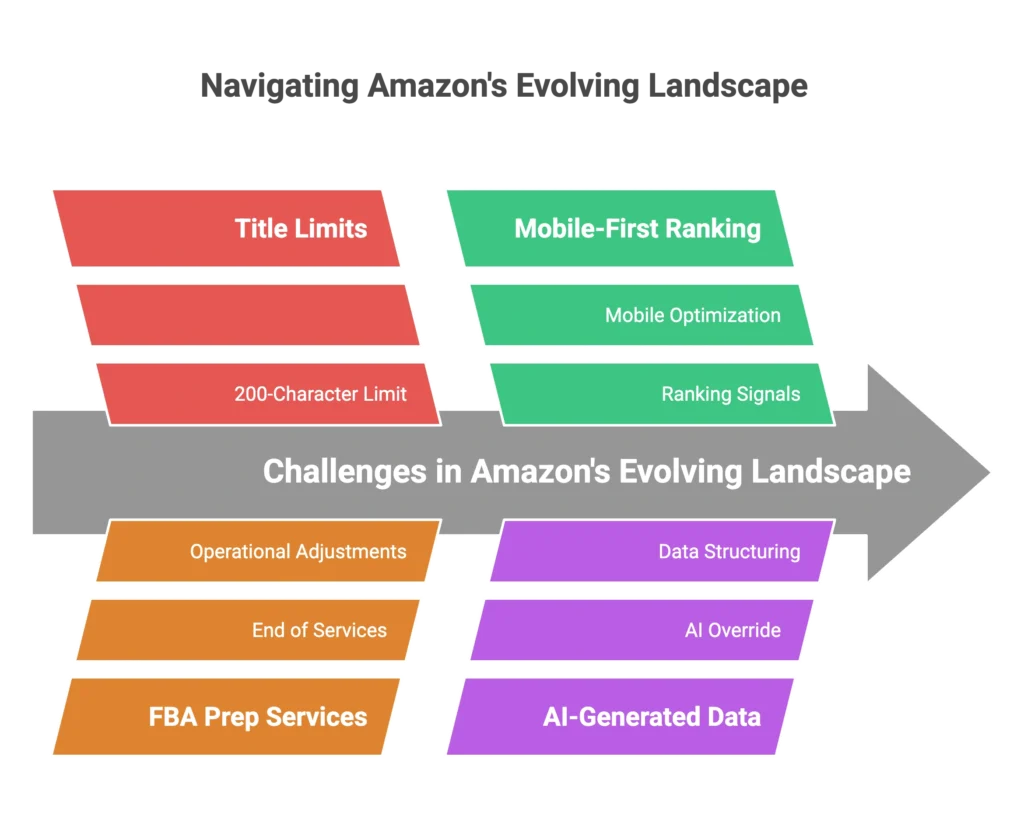
Here’s what changed in 2025 that makes most existing advice obsolete: Amazon’s new 200-character title limits, the end of FBA prep services, mobile-first ranking signals, and AI-generated product data that can override your carefully crafted copy if you don’t structure it correctly.
I’m Hymie Zebede, and I’ve been selling on Amazon for 12+ years. While consultants were writing theory, I was building brands—including one currently doing $400,000/month with zero ad spend. I’ve optimized everything from private label clothing to major licensed brands like Levi’s and Champion.
Most sellers are stuck in an expensive hamster wheel because they treat Amazon like Google Ads instead of understanding it’s a ranking ecosystem. The difference between a listing that struggles at $50K/year and one that dominates at $1M+ isn’t secret tactics—it’s getting the fundamentals right for how Amazon actually works in 2025. Ignoring these core principles is the fastest way to end up in the Amazon seller graveyard, where high-potential products die because they relied on outdated hacks instead of building a sustainable, mobile-first foundation.
“This isn’t another recycled ‘add keywords to your title’ post. This is the complete Amazon listing optimization 2025 playbook—a strategy that accounts for every major shift in Amazon’s algorithm, mobile behavior, and the transition to AI-driven search context. By following these updated standards, you ensure your Amazon listing optimization 2025 efforts align with current operational requirements and the platform’s strict new formatting policies.”
The Mobile-First Reality: Why 70% of Your Traffic Sees a Different Listing
Here’s a reality check that most Amazon sellers haven’t grasped: when someone searches for your product on their phone, they’re seeing a completely different listing than what you optimized on your desktop. Since mobile now accounts for over 70% of traffic, Amazon listing optimization 2025 must prioritize the mobile-first experience rather than the minority desktop view. If you aren’t adapting your strategy to these latest platform shifts, your Amazon listing optimization 2025 efforts will likely fail to capture the majority of active shoppers
What actually shows above the fold on mobile:
- Your main image (taking up 60% of screen real estate)
- The first 80 characters of your title
- Price and Prime badge
- First bullet point (partial view)
That’s it. Everything else requires scrolling, and most shoppers won’t do it unless you’ve already convinced them in those first 5 seconds.
The 5-Second Mobile Conversion Rule
I learned this the hard way while building my clothing brand. I had what I thought was a perfect listing—great keywords, detailed bullet points, professional lifestyle images. But sales were mediocre until I realized most customers were making their buying decision before they ever scrolled past my main image.
“The mobile app experience is ruthless. Your main image needs to communicate value instantly, ensuring your Amazon listing optimization 2025 strategy starts with a visual impact. Your title’s first 80 characters must contain both your primary keyword and your strongest benefit; if someone can’t understand what you’re selling within 5 seconds, your Amazon listing optimization 2025 efforts won’t matter because they’re already gone.”
Title Strategy: 200-Character Limit vs Mobile Truncation
Amazon’s new 200-character title limit sounds generous until you realize mobile truncation makes most of it invisible. Here’s the breakdown:
- Desktop shows roughly 200 characters
- Mobile app truncates at 78-85 characters
- Mobile web shows approximately 110 characters
This means you need a front-loaded title strategy. Your primary keyword and main benefit must live in the first 80 characters. Use the remaining space for supporting keywords that help with long-tail searches, but don’t expect mobile users to see them.
Example structure: “[Primary Keyword] + [Main Benefit] + [Key Qualifier]” for the first 80 characters, then additional descriptors and secondary keywords for the remaining space.
Amazon’s 2025 Policy Shifts That Broke Old Optimization Playbooks
If your listings were optimized before 2025, there’s a good chance they’re now violating Amazon’s updated policies. The platform has gotten stricter about title repetition, promotional language, and image requirements. Sellers who haven’t adapted are seeing suppressed listings and reduced visibility.
Title Repetition Rules and Keyword Stacking Restrictions
The old trick of repeating your main keyword throughout different title elements is now penalized. Amazon’s algorithm detects keyword repetition and can automatically suppress your listing or reduce its visibility in search results.
What changed:
- No keyword repetition across title elements (brand, product type, key features)
- Stricter enforcement of “promotional” language (Best, #1, Premium, etc.)
- Auto-suppression for policy violations instead of manual warnings
I’ve seen established brands get hit with this. One client came to me after their main listing disappeared from search results overnight. The culprit? Their title repeated “premium” three times and “leather” four times across different elements.
My Policy-Proof Framework:
- Primary intent keyword (your main search term)
- Qualifier (size, color, material – but don’t repeat)
- Compliance filter (remove any repetitive words before publishing)
Image Policy Updates: When Other Sellers’ Images Appear on Your PDP
“Here’s a change most sellers missed: Amazon now pulls images from multiple sellers on the same ASIN for certain categories. This shift in Amazon listing optimization 2025 means your carefully crafted infographic might not be the one customers see when they visit your product page. To maintain control, your Amazon listing optimization 2025 strategy must focus on Brand Registry tools that prioritize your specific visual assets over third-party contributions.”
The impact: If you’ve been relying solely on text-heavy infographics to communicate value, you’re now gambling on whether Amazon shows your images or a competitor’s white background shot.
The strategy: Create mandatory white background images that work standalone, plus environment shots that tell your product story even if they’re mixed with other sellers’ images. Your main image is still yours, so make it count.
The Catalog Architecture Mistake That Kills Million-Dollar Listings
Most sellers don’t understand that Amazon treats each size or color of their product like its own separate listing. They’re parented together, but each child ASIN has its own ranking potential and limitations.
Here’s what this means: if you’re selling clothing and you have multiple sizes, one size might rank on page 1 for your main keyword while another size is buried on page 2. When the top-performing size sells out, you don’t just lose that variation’s sales—you lose that keyword ranking position entirely.
Why Child ASINs Make or Break Your Rankings
I experienced this firsthand with my clothing brand. My medium size was crushing it for “men’s workout shirts,” ranking in the top 3. But when I sold out of mediums, the listing didn’t just substitute the large or small. The entire listing dropped in rankings for that keyword because Amazon was specifically ranking the medium size ASIN.
The lesson: Each variation needs its own keyword optimization strategy and inventory management. You can’t treat a parent listing with 8 colors as one product—it’s essentially 8 different products that happen to be grouped together.
The 60-90 Day Stock Rule and Fulfillment Network Effects
Running low on inventory doesn’t just mean you might sell out—it actively hurts your rankings. Amazon’s algorithm deprioritizes listings with low stock levels because the platform wants to recommend products it can consistently fulfill.
“But here’s the hidden issue most sellers miss: with limited stock, Amazon doesn’t spread your inventory evenly across their fulfillment network. This creates shipping time disparities that kill conversions, making Amazon listing optimization 2025 more about inventory health than just copywriting. To succeed, your Amazon listing optimization 2025 strategy must account for regional fulfillment speeds to ensure your ‘Prime’ badge remains consistent for all shoppers.”
Someone in New York might see “2-day shipping” on your product, but a customer in California gets “5-day shipping” for the same item. Guess which one converts better? Amazon notices these conversion rate differences and adjusts your rankings accordingly.
My rule: Maintain 60-90 days of inventory across all variations. This ensures even distribution and consistent shipping promises nationwide.
Backend Optimization: The Hidden Ranking Factors Amazon Won’t Tell You
While everyone focuses on titles and bullet points, backend optimization is where rankings are won or lost. I regularly audit my clients’ accounts and find critical errors that are suppressing their visibility—errors they don’t even know exist.
Search Terms vs Item Type Keywords: The Distinction That Matters
Most sellers treat backend search terms and item type keywords the same way. They’re not. Search terms help with keyword discovery, but item type keywords determine category placement and algorithmic treatment.
Getting your item type keywords wrong can place your product in the wrong category entirely, limiting your visibility to customers who would actually buy your product.
My monthly audit process:
- Download the Category Listing Report from Seller Central
- Check for backend errors and category mismatches
- Verify item type keywords against Amazon’s Browse Tree Guide
- Fix discrepancies before they impact rankings
Browse Tree Guide (BTG) Compliance: The Ranking Factor Most Sellers Ignore
Amazon’s Browse Tree Guide tells you exactly which item type keywords are valid for your category. Ignore it, and you’re gambling with your listing’s discoverability.
“I’ve seen listings with perfect titles and images get buried because their backend item type keywords didn’t match BTG requirements. This technical alignment is a cornerstone of Amazon listing optimization 2025, as Amazon’s algorithm will reduce visibility rather than risk showing your product to the wrong customers. Without precise categorization, even the most creative Amazon listing optimization 2025 efforts will fail to reach your target audience.”
Critical warning: Never let Amazon automatically update your listing. They’ll often “fix” things in ways that hurt your performance. Always maintain control over your backend optimization.
Launch Strategy: Maximizing the Honeymoon Period for Long-Term Success
Amazon gives new products a honeymoon period—a window of increased visibility to test market response. Most sellers waste this opportunity by launching unprepared or treating it like any other day.
Pre-Launch Content Freeze: Why Perfect Listings Launch Better
Here’s my launch sequence that’s worked for multiple brands:
72 hours before launch:
- Complete all listing optimization
- Verify keyword indexing for primary terms
- Set competitive pricing
- Prepare inventory levels
Day 1:
- Launch with coordinated traffic (ads + external if possible)
- Monitor keyword rankings hourly
- Adjust bids based on initial performance
Days 2-14:
- Daily ranking checks and bid optimization
- Customer feedback monitoring
- Inventory velocity tracking
The key is treating the honeymoon period as a ranking sprint, not a gradual ramp-up.
The Ad-to-Rank Strategy vs Traditional PPC
Most Amazon advertising is wasteful because it focuses on immediate sales rather than long-term ranking gains. Every ad dollar should serve a ranking purpose.
Traditional approach: Run ads to generate sales and hope for the best.
My approach: Use ads strategically to climb rankings for specific keywords, then reduce spend as organic rankings improve.
This means accepting lower initial profitability in exchange for sustainable long-term growth. One of my clients now does $400K/month organically after following this strategy—something impossible with traditional pay-per-click thinking.
Operational Changes That Affect Your Listings (2026 Prep Impact)
Starting January 1, 2026, Amazon ends FBA prep and labeling services. This operational shift has direct implications for your listing optimization strategy.
Packaging and Label Accuracy: Why It Matters More Now
When prep and labeling move to sellers and third-party logistics providers, the accuracy of your product images becomes critical. Customers will receive products that might not match your listing photos if there are discrepancies in packaging, labeling, or dimensions.
What this means for listings:
- Packaging photos must accurately reflect what customers receive
- Barcode clarity becomes crucial for fulfillment centers
- Dimensional data accuracy prevents returns and negative reviews
These operational factors directly impact your listing performance through customer satisfaction metrics that Amazon monitors closely.
FAQ: Common Amazon Listing Optimization Questions
What are the biggest Amazon listing optimization changes in 2025?
The three major changes are: 1) Mobile-first ranking signals where 70% of traffic sees truncated titles, 2) New 200-character title limits with stricter repetition rules, and 3) Enhanced image policies where multiple sellers’ images can appear on your product detail page.
How do I optimize Amazon listings for mobile in 2025?
Focus on the first 80 characters of your title since that’s what mobile users see. Your main image must sell the product immediately since it takes up 60% of mobile screen space. The first bullet point should contain your strongest benefit since most users won’t scroll.
Why did my Amazon listing suddenly drop in rankings?
Common causes in 2025 include backend keyword errors (check your Category Listing Report), inventory distribution issues causing slow shipping in some regions, child ASIN stock-outs affecting parent rankings, or Amazon’s automatic listing updates overriding your optimization.
Should I use all 200 characters in my Amazon title?
Not necessarily. While you can use up to 200 characters for desktop, mobile truncates at 78-85 characters. Front-load your primary keyword and main benefit in the first 80 characters, then use the remaining space for supporting keywords that help with long-tail searches.
How long should I run PPC ads for a new Amazon listing?
Ads should run with ranking intent, not just sales intent. During honeymoon period (first 30-60 days), use ads to climb rankings for primary keywords. Once organic rankings stabilize, you can reduce ad spend gradually while monitoring rank maintenance.
The Bottom Line: Organic Rankings Beat Ad Spend Every Time
Amazon listing optimization in 2025 isn’t about stuffing more keywords into your title or copying what worked in 2019. It’s about understanding that Amazon has evolved into a mobile-first, policy-strict ecosystem where organic rankings matter more than ad spend.
The sellers building $1M+ listings aren’t using secret tactics—they’re getting the fundamentals right for how Amazon actually works today. Mobile-first optimization, policy-compliant structures, strategic inventory management, and ranking-focused advertising.
Most sellers will keep following outdated playbooks and wonder why their ad costs keep rising while sales plateau. But you now have the 2025-ready framework that works.
Ready to build listings that dominate organically? I work with a select number of manufacturers, wholesalers, and established brands who want to break free from ad-dependency and build sustainable Amazon growth. If you’re doing $1M+ in traditional retail and ready to crack Amazon the right way, let’s talk.

