 Skip to content
I watched a client lose $380,000 in a single quarter—not from bad products, failed ads, or fierce competition. They lost it because they treated Amazon inventory forecasting like a simple warehouse task instead of understanding it’s actually a ranking algorithm that punishes bad stock decisions.
Most Amazon sellers approach Amazon inventory forecasting like traditional e-commerce, but Amazon operates differently. When you run low on stock—even if you’re not completely out—Amazon’s algorithm interprets this as unreliability and starts deprioritizing your listings. Worse, their fulfillment network won’t distribute limited inventory properly, creating delivery delays that kill conversions and destroy organic rankings. Without a robust Amazon inventory forecasting model that accounts for these regional distribution gaps, your brand risks a ‘ranking suppression’ that can persist long after you’ve restocked your shelves.
After 12 years of selling on Amazon and building my own brand that now does $400K monthly without ads, I’ve learned that inventory forecasting isn’t just about having enough units—it’s about understanding how Amazon’s algorithm rewards consistency and punishes uncertainty.
This framework shows you how to forecast demand in a way that protects your organic ranking, maximizes profitability, and works within Amazon’s operational constraints including the low-inventory-level fees, capacity limits, and fulfillment distribution requirements.
Why Traditional Inventory Forecasting Fails on Amazon
The Hidden Algorithm Truth Most Sellers Miss
“Amazon treats low inventory as a reliability signal, not just a supply issue; the algorithm now assigns a Proximity Index score based on how many regional zones your stock covers. This means Amazon inventory forecasting must go beyond simple unit counts to ensure your products are physically distributed across the fulfillment network to maintain fast delivery promises. The current algorithm constantly compares your availability against competitors, so your Amazon inventory forecasting strategy is now a direct driver of organic ranking stability and Buy Box eligibility.”
When my own brand ran low on certain sizes, I had inventory, but Amazon couldn’t promise 2-day shipping in all regions. Customers in California saw 2-day delivery while New York customers saw 5-day shipping. This is why your Amazon listing is failing even when you think you’re “in stock”—the algorithm sees the shipping delay, drops your conversion rate, and kills your organic ranking momentum.
Here’s what happens in the background: Amazon’s algorithm notices that customers in certain regions are seeing longer delivery times. It interprets this as poor customer experience and starts ranking competitors higher who can promise faster delivery nationwide.
The Multi-Variable Complexity Sellers Underestimate
“People think having 50 units means they’re safe, but if those 50 units are in one fulfillment center, customers in other regions see longer delivery times. This regional imbalance is a major failure in Amazon inventory forecasting, as the algorithm now assigns a proximity score that favors local stock. Amazon’s algorithm reads slow regional shipping as a poor customer experience and starts ranking competitors higher, proving that accurate Amazon inventory forecasting must account for geographic distribution, not just total unit counts.”
This creates three critical problems most sellers don’t anticipate:
Days of Supply (DOS) vs. Unit Count Confusion: Amazon cares about how many days of supply you have, not total units. A listing selling 10 units daily with 100 units in stock has 10 days of supply—dangerously low by Amazon’s standards.
Child ASIN Independence: Each size and color variation ranks independently. If your best-selling child ASIN—the one driving most of your keyword rankings—runs out of stock, Amazon doesn’t automatically promote another variation to take its place. You lose that ranking position entirely.
Fulfillment Center Distribution Requirements: For nationwide 2-day shipping coverage, your inventory needs to be spread across multiple fulfillment centers. When you’re running low, Amazon consolidates inventory into fewer locations, creating delivery delays that hurt conversions.
The Forecast-to-Constraints Framework
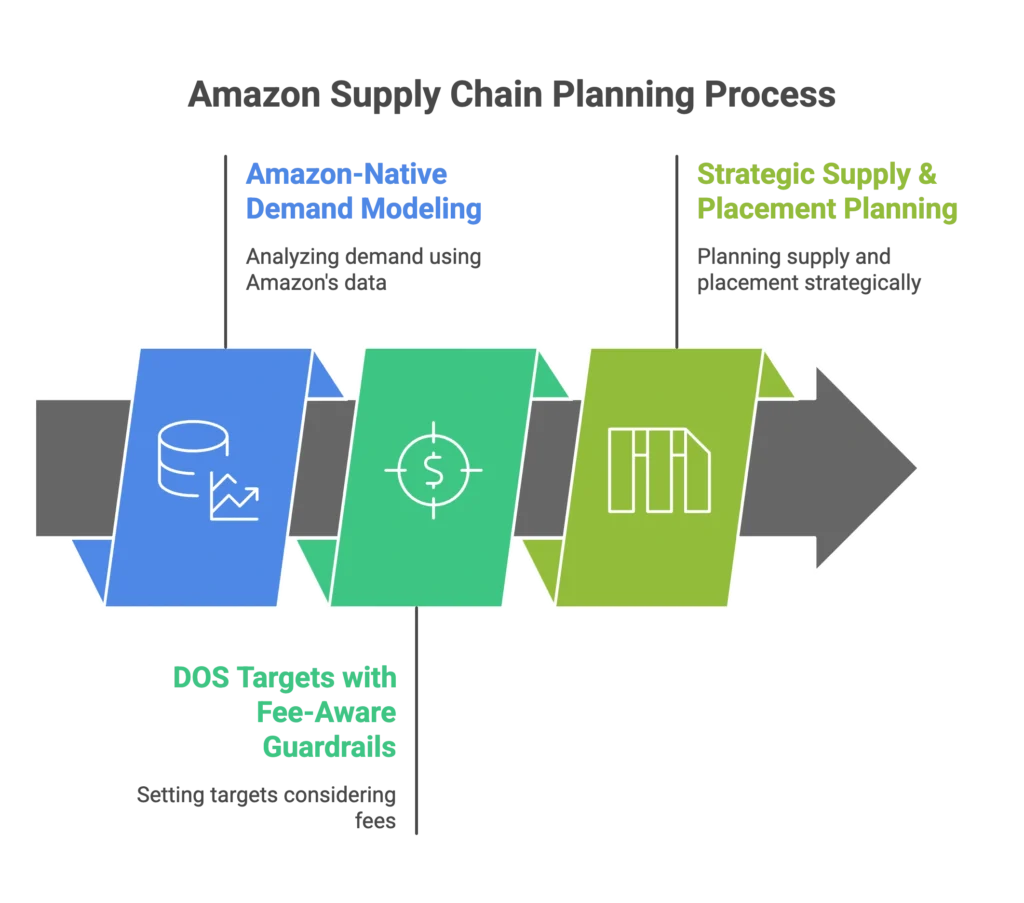
Step 1: Amazon-Native Demand Modeling
Traditional forecasting looks at historical sales trends. Amazon-native forecasting considers how your organic rankings affect future sales velocity.
Historical Sales Analysis: Beyond basic trend analysis, identify rank-driven sales spikes. When you move from page 2 to page 1 for a major keyword, your sales velocity changes dramatically. This needs to factor into your forecasting.
Keyword Velocity Tracking: Monitor when organic rankings improve and correlate to sales increases. I’ve seen listings double their daily sales velocity simply by moving up 3-4 positions for their main keyword.
Competitive Stock Monitoring: Track when competitors go out of stock to predict demand shifts. When a major competitor runs out of inventory, their sales volume doesn’t disappear—it shifts to available competitors, creating temporary spikes in your demand.
I built a tool using ChatGPT that imports where your inventory sits in Amazon’s fulfillment network and generates a map showing coverage by ZIP code. This shows me exactly where we’re vulnerable to delivery delays before they impact rankings.
Step 2: DOS Targets with Fee-Aware Guardrails
“The new reality includes Amazon’s low-inventory-level fees, which make running lean expensive and turn Amazon inventory forecasting into a high-stakes survival tool. To stay profitable, you need to target 60-90 days of supply rather than the 30 days common in traditional e-commerce, ensuring your Amazon inventory forecasting models account for the platform’s strict 28-day minimum stock thresholds. Failing to maintain this buffer doesn’t just risk stockouts; it triggers immediate per-unit penalties that can quickly erode your margins.”
Calculate DOS by Child ASIN: Don’t look at parent-level inventory. Each variation needs independent planning because they rank independently. Your red medium t-shirt might be your top performer for “men’s casual shirt,” while your blue large barely ranks at all.
Set Fee-Threshold Alerts: Amazon charges low-inventory-level fees when you drop below certain thresholds. Set alerts at 45-day supply levels to give yourself time to reorder before hitting fee territory.
Build Buffer Zones: Seasonal demand spikes, Prime events, and Q4 all create unpredictable velocity increases. In my client calls, I’m constantly telling them to send 90 days worth of stock per child ASIN. When someone tries to send only 30 days, they’re guaranteed to hit problems during peak seasons when Amazon’s receiving delays extend.
Step 3: Strategic Supply & Placement Planning
Inbound Placement Strategy: Amazon offers different placement options—Amazon-optimized (they choose where to send inventory), partial splits (moderate distribution), and minimal splits (single destination). Your choice affects both costs and delivery promise coverage.
Lead Time Management: Account for supplier lead times, shipping duration, Amazon’s receiving delays (typically 2-6 weeks), and safety buffers. During peak seasons, add extra weeks for capacity constraints.
AWD Integration: Amazon Warehousing & Distribution can serve as an upstream buffer, allowing you to stage inventory closer to Amazon’s network and replenish FBA locations as needed without long international shipping delays.
Usually I’m telling people send in 90 days worth of stock at all times per child, and there’s delays already and then also there’s October Prime Monday, there’s Black Friday, Cyber Monday, there’s Christmas. You can’t cut it close during these periods.
The Hidden Costs of Getting This Wrong
Ranking Destruction Chain Reaction
Low inventory creates a domino effect that destroys long-term value:
- Low stock leads to poor geographic distribution
- Extended delivery times lower conversion rates
- Algorithm notices poor performance and reduces visibility
- Reduced visibility creates lower sales velocity
- Lower velocity damages rankings, making recovery harder
Some of my sizes weren’t completely out of stock, but Amazon didn’t have enough inventory to place them in every warehouse. Customers in certain states saw 4-5 day delivery times, which lowered conversions and hurt organic rank.
“This had nothing to do with my product quality or ad performance; it was a pure lesson in the power of Amazon inventory forecasting. The moment my stock levels improved, organic ranks and sales picked right back up, proving that the algorithm now treats consistent supply as a primary ranking signal. A lot of ‘gurus’ told me this wouldn’t work—that shutting off ads would destroy my listing—but they failed to account for how Amazon inventory forecasting stabilizes your baseline. In the end, the numbers don’t lie: reliability beats ad spend every time.”
The $500K Quarterly Mistake Pattern
The most expensive mistakes happen when sellers:
Launch with insufficient inventory: Starting a new product with only 100 units means Amazon can’t distribute inventory properly for nationwide coverage. Your launch momentum gets killed by delivery delays.
Wait until 30 days supply to reorder: During peak seasons, this creates stockouts. Recovery takes 3-6 months because you lose organic ranking momentum and have to rebuild algorithm confidence.
Ignore child ASIN performance variations: If your top-performing child ASIN runs out while other variations have plenty of stock, you lose your best keyword rankings. The algorithm doesn’t automatically transfer that ranking power to other variations.
Miss capacity planning cycles: Amazon releases capacity limits monthly. If you don’t plan purchases around these cycles, you might have inventory ready to ship but no warehouse space to receive it.
Advanced Forecasting Strategies That Actually Work
The Regional Coverage Method
“My custom Amazon inventory forecasting tool imports where your inventory sits in Amazon’s fulfillment network and shows coverage by ZIP code. This reveals exactly where customers will see longer delivery times before it impacts your rankings, allowing you to run a more proactive Amazon inventory forecasting model. By identifying these regional gaps early, you can adjust your inbound shipments to ensure ‘Next-Day’ eligibility remains consistent across the entire country.”
Monitor Geographic Distribution: Use Amazon’s Manage FBA Inventory reports to see how inventory spreads across fulfillment centers. If most units are concentrated in 1-2 locations, you’re vulnerable to delivery delays.
Track Delivery Promise Variations: Regularly check your listings from different ZIP codes. If customers in some regions see 4-5 day shipping while others see 2-day, your conversion rates will suffer in the slower regions.
Adjust Reorder Timing: When you see inventory concentration in few fulfillment centers, expedite your next shipment to maintain broader distribution.
Capacity-Calendar Integration
Amazon releases monthly capacity limits and announces them in advance. Smart forecasting aligns purchase orders with these capacity cycles.
Plan Q4 Early: Submit Capacity Manager requests by August for holiday season inventory. Don’t wait until October when everyone else is scrambling for space.
Monitor Monthly Announcements: Amazon typically updates capacity limits around the 15th of each month. Plan your shipment timing around these announcements.
Buffer for Delays: Amazon’s receiving process can take 2-6 weeks, plus additional time for FC transfers. If you need inventory available by November 1st, it should arrive at Amazon by mid-September.
AWD Buffer Strategy
Amazon Warehousing & Distribution works as upstream inventory staging, especially valuable for high-velocity ASINs and seasonal preparation.
Calculate Upstream Buffer: Keep 30-45 days supply in AWD for your fastest-moving products. This allows quick replenishment of FBA locations without waiting for international shipping.
Set Replenishment Triggers: When FBA inventory drops to 60 days supply, trigger AWD-to-FBA transfers to maintain consistent availability.
Cost Analysis: Compare AWD storage fees against low-inventory-level fees and stockout risks. For most high-velocity products, AWD provides better economics and ranking protection.
Implementation: Your First 30 Days
Week 1: Audit Current Inventory Health
Download Category Listing Reports for all ASINs from Seller Central. Analyze DOS by child ASIN, not parent level—this reveals which specific variations are vulnerable. Map current fulfillment center distribution using the Manage FBA Inventory report to identify geographic gaps.
Week 2: Set Up Monitoring Systems
Create a DOS tracking spreadsheet with fee-threshold alerts at 45-day supply levels. Test your listings from different ZIP codes to monitor delivery promise variations. Begin tracking organic ranking correlation with inventory levels for your top ASINs.
Week 3: Develop Reorder Triggers
Calculate total lead times: supplier time plus shipping duration plus Amazon receiving delays plus safety buffer. Set reorder points at 60-day supply minimum for consistent performers, 90 days for seasonal products. Plan Q4 capacity requests if you haven’t already.
Week 4: Test and Refine
Compare your forecasting accuracy with actual sales data. Adjust DOS targets based on velocity changes—if rankings improve, velocity might spike. Document lessons learned and create templates for next quarter’s planning.
Frequently Asked Questions
How do I avoid Amazon’s low-inventory-level fees while maintaining good rankings?
Target 60-90 days supply per child ASIN, monitor DOS weekly, and set reorder alerts at 45-day thresholds. The fee cost is usually less than the ranking damage from running low.
Why does my organic ranking drop even when I have inventory in stock?
Geographic distribution matters more than total units. If Amazon can’t promise 2-day shipping nationwide, rankings suffer because conversion rates drop in regions with slower delivery promises.
What’s the minimum inventory to launch a new Amazon product successfully?
Never less than 60 days supply across all variations based on projected daily velocity. New launches need consistent availability to build algorithm confidence and maintain honeymoon period momentum.
Should I use Amazon Warehousing & Distribution (AWD) for inventory management?
Yes, for high-velocity ASINs and seasonal preparation. Calculate ROI versus FBA fees and stockout risks. AWD typically pays for itself by preventing ranking damage from inventory gaps.
The Bottom Line
Amazon isn’t a traditional e-commerce platform—it’s a ranking algorithm that happens to sell products. Your inventory decisions directly impact your organic visibility, which affects your long-term profitability more than any other factor.
The sellers who understand this build sustainable businesses with strong organic rankings and reduced ad dependency. The ones who don’t end up trapped in an expensive cycle of rising ad costs and declining margins.
Treat your inventory like the ranking protection it is, not just units in a warehouse. Your organic rankings—and your profit margins—depend on getting this right.
Ready to stop making expensive inventory mistakes? Start with the audit process above, and remember: it’s better to have slightly more inventory than perfect cash flow optimization. Rankings lost to stockouts take months to recover, but cash flow problems are usually temporary.

