 Skip to content
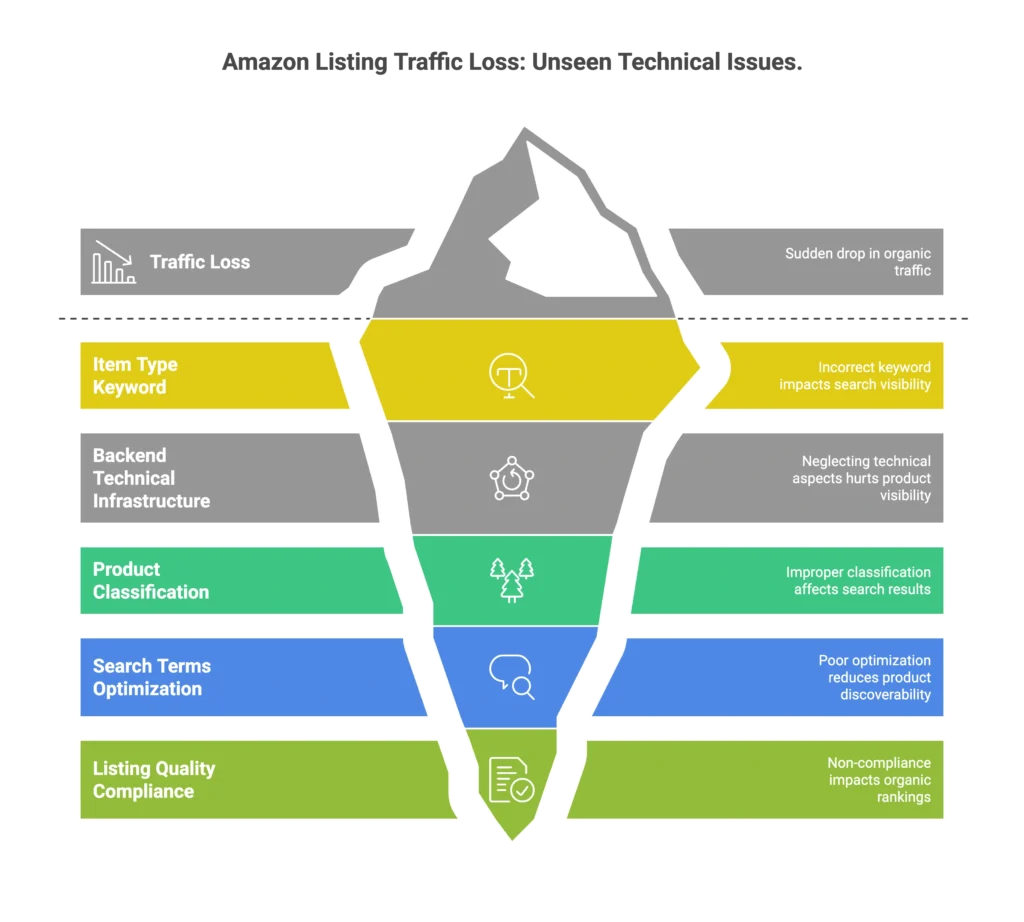
Your Amazon listing just lost 60% of its organic traffic overnight. No algorithm update. No competitor attack. Amazon’s bots silently changed your item type keyword from “Pajama Sets” to “Pajamas Sets”—and you had no idea until sales tanked. This is the reality of Amazon technical SEO, where even a minor, automated backend shift can disconnect your product from the very search nodes that drive your revenue.
After 12+ years of building listings that do over $1M annually on single SKUs, I’ve seen this exact scenario destroy otherwise profitable brands. Most sellers obsess over frontend optimization—better images, catchier titles, premium A+ content—while completely ignoring the backend technical infrastructure that actually determines whether Amazon shows their products in search results.
The reality? The technical levers that matter most happen behind the scenes: proper product classification via Browse Tree Guides (BTG), strategic item type keyword mapping, byte-safe search terms optimization, and Listing Quality Dashboard (LQD) compliance monitoring. Get these wrong, and no amount of pretty pictures will save your organic rankings.
This guide reveals the backend technical framework I use to build dominant Amazon listings—the same system that helped me create a $400K/month listing without ad dependency. You’ll learn the step-by-step process to audit, fix, and optimize the technical foundation that drives sustainable organic growth.
The Hidden Infrastructure Behind Million-Dollar Amazon Listings
Why Most Amazon SEO Advice Misses the Mark
Most agencies treat Amazon like Google Ads instead of understanding it’s an ecosystem where organic ranking is everything. They focus on surface-level optimizations while missing the fundamental truth: Amazon technical SEO is a chain reaction engine where ads affect rank, rank affects reviews, reviews affect conversion, and conversion affects ad efficiency. If one part of your Amazon technical SEO strategy breaks, the entire ecosystem suffers.
I’ve managed accounts where fixing a single backend classification issue restored 60% of lost organic traffic within days. These aren’t lucky breaks—they’re the predictable results of understanding how Amazon’s technical infrastructure actually works.
The problem is that most sellers don’t even know these systems exist. They’re editing titles and bullets while Amazon’s bots are quietly destroying their listings from the inside out.
The Technical Foundation That Actually Moves Rankings
Amazon rewards complete, compliant catalog data that remains indexable and visible in search and browse. This means three things must align perfectly:
Product Classification – Your item must be mapped to the correct product type and browse node using Amazon’s official Browse Tree Guide documentation.
Attribute Completeness – Every required field must be populated correctly, or Amazon’s bots will auto-fill them incorrectly.
Policy Compliance – Your backend data must follow Amazon’s specific rules, or your listing gets suppressed without warning.
When these elements work together, you create listings that rank organically and stay ranked. When they don’t, you’re stuck in the expensive hamster wheel of ad dependency.
The 5-Layer Amazon Technical SEO Framework
Layer 1: Product Classification Mastery (The Foundation)
The Problem: Amazon bots automatically fill missing classification fields with irrelevant data. One day your product is categorized as “Pajama Sets,” the next it’s “Pajamas Sets.” This seemingly minor change can derail your rank, PPC performance, and visibility completely.
The Solution – My Classification Protocol:
- Use the Product Classifier Tool in Seller Central to confirm your correct product type
- Cross-reference with Browse Tree Guide (BTG) to verify node and attribute expectations match your category
- Verify item type keyword alignment ensures your classification drives the right search filters
- Audit via Category Listing Report to catch any inconsistencies before they cause problems
Technical Implementation: Access the Product Classifier through Seller Central’s “Add a Product” workflow. Input your product details and note the recommended classification. Then cross-check this against the BTG documentation for your category to ensure the item type keyword and browse node align perfectly.
Pro tip: I use specific AJAX URLs to enhance my Amazon technical SEO by auditing competitor classifications and verifying my own listings are properly indexed. This reveals backend data that’s invisible through normal Seller Central views, providing a massive advantage for anyone serious about mastering Amazon technical SEO.
Layer 2: Search Terms Optimization (The Byte-Safe Method)
The Critical Misconception: Most sellers quote conflicting search terms limits—250 vs 500 vs 2500 characters—without understanding Amazon actually uses byte limitations. Exceed the byte cap, and Amazon ignores your entire search terms field.
My Byte-Safe Backend Method:
- Understand bytes vs. characters – Special characters count as multiple bytes
- Stay under the byte cap – Conservative limits prevent field rejection
- Eliminate duplication – No keyword repetition across any fields
- Avoid policy violations – Certain terms trigger automatic suppression
I’ve seen sellers lose rankings because they stuffed 500 characters into a 249-byte field, causing Amazon to reject their entire backend optimization. The fix isn’t adding more keywords—it’s using the right ones within technical limits.
Step-by-Step Process: First, export your current search term reports to see which keywords actually drive sales. Then populate your backend search terms with relevant, non-duplicated keywords that stay well under byte limits. Always verify your entries save successfully in Seller Central—if they don’t stick, you’ve exceeded the limit.
Layer 3: Inventory File Architecture (The Scaling System)
Wrong inventory template selection creates attribute mismatches that suppress listings. I’ve rescued accounts where sellers used “Generic” templates for specialized products, causing Amazon to hide their listings from relevant searches.
My Template Selection Method:
- Map each SKU to correct product type/node using BTG cross-reference
- Choose the right inventory file template for your specific category requirements
- Populate all required attributes to prevent Amazon’s bots from auto-filling incorrectly
- Maintain consistency across variations to enable proper review merging
When I audit accounts, I often find that listings with identical products show different review counts across color variations. This indicates backend attribute misalignment that also destroys ranking performance.
Layer 4: Image & Content Compliance (The Visibility Guard)
Beyond basic guideline compliance, technical image requirements directly impact your ability to rank. Amazon prioritizes larger images for zoom functionality, and mobile users—who represent the majority of traffic—never scroll past the title if the first image doesn’t convert.
Technical Requirements That Matter:
- Pixel minimums for zoom – Images below threshold get deprioritized in search
- Category-specific style guides – Each category has different title and bullet requirements
- Mobile-first optimization – Your listing must convert on mobile or organic rankings suffer
I optimize all my listings mobile-first because that’s where most purchase decisions happen. A title that works perfectly on desktop might be completely invisible on mobile.
Layer 5: Listing Quality Dashboard Monitoring (The Early Warning System)
The Listing Quality Dashboard flags technical issues before they cause suppression, but most sellers ignore it until it’s too late. I check LQD monthly for all client accounts because catching issues early prevents ranking disasters.
My Proactive LQD Process:
- Understand risk categories – “At-risk” means Amazon identified potential policy violations
- Prioritize fixes – Missing required attributes cause immediate suppression
- Monthly monitoring – Regular audits catch problems before they impact sales
- Remediation workflow – Systematic approach to recovering suppressed listings
When listings get suppressed, most sellers panic and start changing everything. My remediation workflow addresses root causes systematically: fix LQD issues first, verify image and title compliance, re-classify if needed, then optimize search terms within limits.
The Technical SEO Audit Process
Phase 1: Health Check Protocol
Start with these immediate diagnostic steps:
- Download your Category Listing Report from Seller Central to see exactly how Amazon categorizes your products
- Run a complete LQD scan across all ASINs to identify compliance issues
- Verify Browse Tree Guide compliance for each product type you sell
- Check search terms byte utilization to ensure you’re not exceeding limits
Red flags to watch for: Different review counts across child variations, extended delivery times despite adequate inventory, sudden ranking drops without external factors, or search term fields showing as empty after you save them.
Phase 2: Backend Optimization Sequence
My systematic remediation approach:
- Fix LQD issues first – Address missing required attributes immediately
- Verify image and title policy compliance – Prevent suppression triggers
- Re-classify via Product Classifier if your category mapping is wrong
- Optimize search terms within byte limits using proven keywords
- Revalidate through LQD to confirm all fixes registered properly
This sequence matters. Sellers who jump straight to keyword optimization while ignoring classification issues waste time and often make problems worse.
Advanced Technical Strategies
The Child ASIN Ranking Reality
Amazon treats each size or color as its own listing for ranking purposes, which is a critical factor in Amazon technical SEO. I’ve seen sellers dominate page 1 with their medium size while their large size sits on page 3 for the same keyword. If you sell out of that top-performing child ASIN, Amazon doesn’t automatically promote another—you lose that ranking position entirely, making stock management an essential part of your Amazon technical SEO strategy.
This is why I maintain 60-90 days of inventory for each variation and treat every child ASIN like its own business. When inventory drops below 30 days, Amazon deprioritizes your listing because they see low stock as a delivery risk.
Strategic Inventory Management: With limited stock, Amazon can’t distribute inventory evenly across warehouses. Customers in New York might see 2-day shipping while California customers see 5-day shipping. That delivery time difference kills conversions and hurts organic rankings as Amazon notices competitors getting more sales.
Review Merging Technical Requirements
When reviews don’t merge across variations, it usually indicates a backend misalignment that also destroys rankings. I prioritize Amazon technical SEO by checking item-type keyword consistency, verifying GL (Generic Linking) values, and ensuring browse node alignment across all children. Addressing these Amazon technical SEO factors is the only way to restore review aggregation and regain organic visibility.
Fix the backend alignment, and reviews merge properly. More importantly, your rankings stabilize because Amazon can properly index your complete product data.
Common Technical SEO Mistakes to Avoid
The Classification Trap: Never accept Amazon’s automatic suggestions without verification. I’ve seen accounts where Amazon suggested moving swimwear into “Clothing” instead of proper “Swimwear” classification, killing visibility for swim-specific searches.
The Search Terms Pitfall: Keyword stuffing across multiple backend fields doesn’t help—it hurts. Amazon’s algorithm detects repetition and may penalize your entire listing. Focus on unique, relevant keywords that stay within byte limits.
The Inventory Management Blind Spot: Ignoring delivery time impact on rankings is expensive. When my own brand’s inventory dropped and delivery times extended to a week, organic rankings fell immediately—not because I paused ads, but because longer delivery estimates killed conversions.
Frequently Asked Questions
How do I know if my search terms exceed Amazon’s byte limit? Amazon uses byte counting, not character counting. Stay well under stated limits and verify your entries save successfully. If they don’t stick, you’ve exceeded the byte cap and Amazon rejected the entire field.
What’s the difference between item type keyword and browse node? Item type keyword determines which template and attributes you can use. Browse node determines where your product appears in Amazon’s category structure. Both must align perfectly with your actual product for optimal performance.
How often should I check the Listing Quality Dashboard? Monthly minimum, but immediately after any listing changes or if you notice ranking drops. LQD flags issues before they become severe enough to cause suppression.
Why do my reviews show different counts across color variations? This indicates backend attribute misalignment, specifically with item type keywords or browse nodes. When these don’t match perfectly across children, reviews won’t merge and rankings suffer.
The Technical SEO Advantage
While competitors focus on surface-level optimizations, you now understand the backend infrastructure that actually determines Amazon success. These Amazon technical SEO foundations—proper classification, byte-safe search terms, LQD compliance, and strategic inventory architecture—create sustainable competitive advantages. By mastering Amazon technical SEO, you build a robust framework that drives long-term organic growth and ensures your brand remains resilient against algorithm shifts.
Amazon isn’t just about having a great product anymore. It’s about having great technical execution that keeps your products visible, indexed, and ranking in an increasingly competitive ecosystem. The sellers who master these backend optimizations will dominate their categories while others struggle with ad dependency and ranking volatility.
Master the technical foundation first. Everything else becomes easier when Amazon’s algorithm can properly index, classify, and rank your products. That’s how you build listings that consistently generate six and seven figures annually—not through luck or secrets, but through systematic technical excellence.
Technical SEO Audit Checklist
Immediate Actions (Next 48 Hours):
- Download Category Listing Report from Seller Central
- Run complete Listing Quality Dashboard scan
- Verify current search terms byte utilization
- Check for review merging consistency across variations
Monthly Deep Audit:
- Browse Tree Guide compliance verification
- Complete backend attribute consistency check
- Search terms optimization review and updates
- Product classification accuracy validation

