 Skip to content
If your sales collapse the second you turn off ads, you’re not building a business—you’re paying rent.
Amazon ranking drops cause most sellers to panic, but reacting with more ad spend is usually a mistake. Their immediate reaction is to increase bids and add more keywords, pouring money into the problem until sales recover. But here’s what they don’t realize: they’re treating the symptom, not the disease.
After 12+ years of building and scaling brands on Amazon—including my own current brand that maintained top rankings with zero ad spend for over a month—I’ve learned that ranking drops have systematic root causes. The sellers who thrive long-term aren’t the ones with the biggest ad budgets. They’re the ones who master building Amazon brands without ads and can diagnose problems before they become crises.
Amazon operates like a sophisticated retail store, not a simple advertising platform. When your rankings drop, the algorithm is telling you something specific about your listing’s health, inventory management, or competitive positioning. The key is knowing how to listen—and more importantly, how to respond with precision rather than panic.
This isn’t about throwing more money at the problem. It’s about using Amazon’s own diagnostic tools to identify whether your ranking drop stems from traffic issues, conversion problems, Buy Box instability, catalog suppression, or inventory mismanagement. Once you know the real cause, the solution becomes clear and cost-effective.
The Amazon Ranking Reality Check
Why Most Sellers Misdiagnose Ranking Drops
The biggest mistake I see sellers make is assuming that ranking drops automatically equal “need more ads.” This reactive approach keeps them trapped in what I call the “ad hamster wheel”—constantly spending more to maintain the same position, never building sustainable organic growth.
Amazon’s algorithm doesn’t work like Google Ads. It’s not simply about who can afford to bid the highest. Amazon rewards consistency, conversion optimization, and inventory health because their primary goal is customer satisfaction. When your rankings drop, it’s often because one of these foundational elements has weakened.
Here’s something most sellers don’t understand: Amazon treats each size or color variation like its own individual listing. If your medium-sized black t-shirt ranks #3 for “men’s workout shirt,” that doesn’t mean your large blue t-shirt will rank anywhere close. When you run out of stock on that top-performing child ASIN, Amazon doesn’t just substitute another variation. You lose that ranking position entirely, and your whole parent listing takes a hit.
I learned this the hard way when managing inventory across multiple variations. One top-performing size would sell out, and suddenly our entire listing’s visibility would plummet. We weren’t just losing sales from that one variation—we were losing the algorithmic momentum that variation had built for our entire product family.
The myth that “more spend equals more growth” keeps sellers reactive instead of strategic. Yes, advertising is important, especially during the honeymoon period when new listings get algorithmic favor. But if your only strategy is increasing ad spend every time rankings slip, you’re building a house on quicksand.
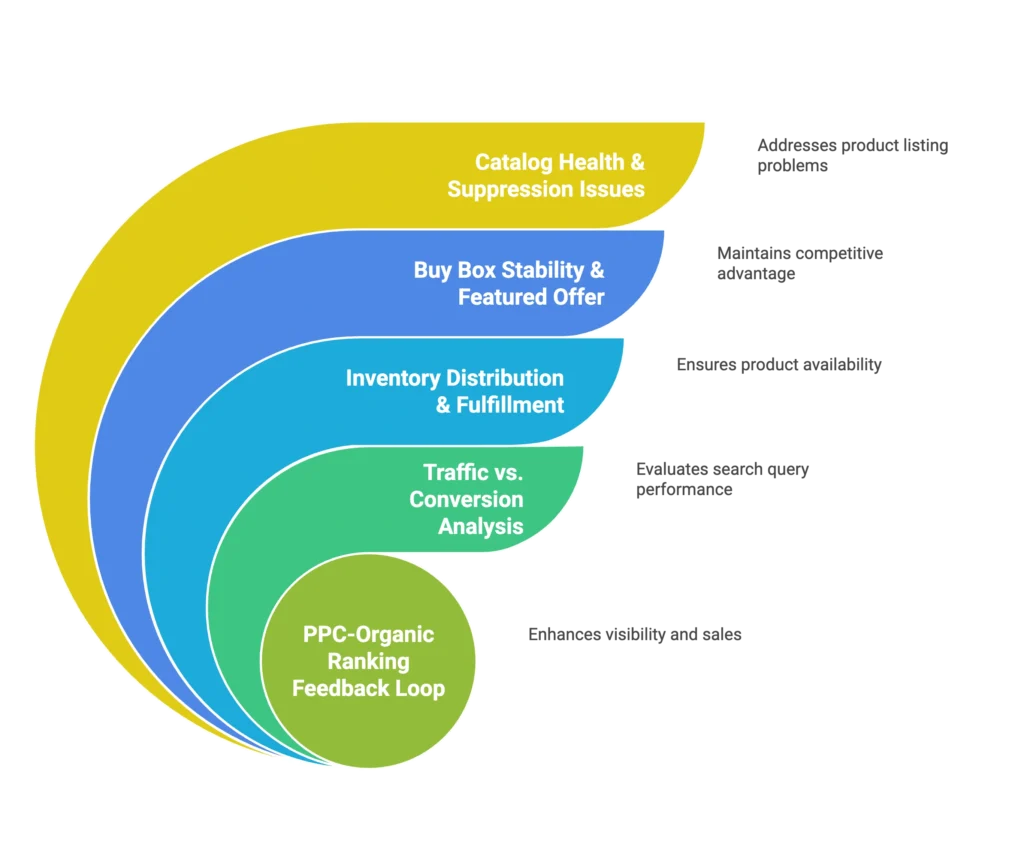
The 5-Factor Ranking Drop Diagnostic System
When rankings drop, don’t guess. Diagnose. Amazon provides specific tools in Seller Central that reveal exactly what’s going wrong. Here’s the systematic approach I use to identify root causes and implement targeted solutions.
Factor 1: Catalog Health & Suppression Issues
The Silent Killers
Amazon’s bots love to make changes without telling you. One day your product is categorized as “Pajama Sets,” and the next day it’s “Pajamas Sets.” Sounds like a tiny difference, but that small change can derail your ranking, PPC performance, and visibility overnight.
The worst part? Everything looks normal on the front end. Customers can still find and buy your product, so you might not notice for weeks. Meanwhile, Amazon’s algorithm is treating your listing like it belongs in a completely different category, matching it against irrelevant competitors and showing it for wrong search terms.
Diagnostic Steps
Start with the Search Suppressed & Inactive Listings report in Seller Central. This shows you listings that are literally hidden from search and browse results. If your product appears here, you’ve found your smoking gun. Amazon has flagged specific attributes or images that violate their guidelines, and your listing is invisible to potential customers.
Next, download the Category Listing Report. This reveals backend classification errors that aren’t visible in your regular listing management interface. Look for discrepancies between what you think your product is categorized as and what Amazon’s system actually shows.
Use the Browse Tree Guide (BTG) to verify that your item type keywords and browse nodes align with your intended category. Even small mismatches here can completely misposition your product in Amazon’s taxonomy.
Quick Recovery Actions
Access the Listing Quality Dashboard and click “View all improvements.” Amazon will show you specific missing attributes, image violations, or content gaps. Use the bulk add missing attributes feature to fix multiple issues simultaneously rather than editing each ASIN individually.
The key principle: never let Amazon auto-populate your backend fields. Fill every available attribute yourself, even if it seems optional. When fields are empty, Amazon’s bots will fill them in, and they usually get it wrong.
Factor 2: Buy Box Stability & Featured Offer Health
The Buy Box-Ranking Connection
Here’s something most sellers miss: losing the Buy Box directly correlates with organic ranking drops. When you lose Featured Offer status, Amazon doesn’t just give the sale to a competitor—they also deprioritize your listing in search results.
Buy Box instability can happen for dozens of reasons: a competitor drops their price by a few cents, your shipping times change, you have a brief stock shortage, or Amazon’s algorithm decides another seller offers better customer value. Even temporary Buy Box losses can trigger ranking cascades that take weeks to recover from.
Diagnostic Process
Check your Featured Offer eligibility in Seller Central. If you’re not winning the Buy Box consistently, you need to understand why. Is it price? Shipping speed? Customer metrics? Inventory availability?
Monitor your handling times and shipping promises. If your delivery estimates have extended even by a day or two, that can tip the Buy Box algorithm toward competitors. During a recent stock shortage with my own brand, I watched organic rankings drop not because we were out of stock, but because delivery times extended from 2 days to 5-7 days in certain regions.
Stabilization Strategy
Address delivery time extensions immediately. If inventory is running low, consider adjusting your shipping templates or fulfillment methods rather than just hoping for the best. Sometimes moving from FBA to Seller Fulfilled Prime or vice versa can restore fast shipping promises while you resolve inventory issues.
Price competitively, but don’t race to the bottom. Amazon’s Buy Box algorithm considers total customer value, not just the lowest price. A slightly higher price with faster shipping often wins over a lower price with slow delivery.
Factor 3: Inventory Distribution & Fulfillment Impact
The Hidden Inventory Problem
Just because you have inventory in FBA doesn’t mean Amazon is showing your product with fast shipping. If your stock isn’t properly distributed across fulfillment centers, customers in different regions will see drastically different delivery times—and that kills conversions.
I aim for 60-90 days of inventory minimum because when you drop below 30 days, Amazon’s algorithm starts treating your product like clearance merchandise. They won’t put low-stock items on the “front shelf” of search results because they can’t guarantee consistent availability to customers.
Distribution Impact on Rankings
Amazon spreads inventory across fulfillment centers based on demand patterns and stock levels. When you’re running low, they might keep all remaining units in one or two facilities. This means a customer in New York sees “next-day delivery” while someone in California sees “5-7 business days” for the same product.
That delivery time difference destroys conversion rates. When conversions drop, Amazon interprets this as lower customer demand and reduces your organic visibility. It becomes a vicious cycle: slower shipping leads to fewer conversions, which leads to lower rankings, which leads to even less visibility.
Inventory Health Protocol
Monitor days of supply at the child ASIN level, not just the parent. Each variation needs adequate stock to maintain its individual ranking momentum. Treat each size, color, or style like its own business with its own inventory requirements.
Plan inventory distribution 60+ days in advance. Don’t wait until you’re down to 30 days to reorder—by then, Amazon ranking drops are already inevitable as the algorithm deprioritizes your listings. When I pause ads due to low inventory, it’s because running ads on low-stock items damages your long-term organic position.
Factor 4: Traffic vs. Conversion Analysis Using Search Query Performance
The Missing Data Layer
Most sellers are flying blind when it comes to understanding their ranking drops. They see lower sales and assume they need more traffic, so they increase ad spend. But what if the problem isn’t traffic—what if it’s conversion?
Search Query Performance (SQP) in Seller Central reveals the truth behind your sales fluctuations. This tool shows exactly how many customers searched for terms, how often you appeared, and how many converted. When you export this data regularly, you can pinpoint whether Amazon ranking drops are traffic-driven or conversion-driven.
SQP Diagnostic Process
Export your SQP data weekly and track trends for your priority keywords. Look for patterns: are your impressions dropping (traffic problem) or are your click-through and conversion rates declining (listing problem)?
When diagnosing Amazon ranking drops, if impressions are falling but conversion rates stay steady, you have a visibility issue. Focus on improving placement or addressing catalog problems. If impressions remain strong but conversions drop, your listing needs optimization—better images, copy, or pricing.
Map your keyword performance over time. I track the top 40 keywords my competitors rank for and monitor how my organic positions change week by week. This helps me identify which specific terms are driving overall ranking trends.
Action Framework by Diagnosis
Traffic issues require placement solutions: strategic advertising, keyword optimization, or resolving catalog problems that affect search visibility. Conversion issues require listing optimization: improving images, refining copy, adjusting pricing strategy, or addressing review concerns.
Factor 5: The PPC-Organic Ranking Feedback Loop
Strategic PPC Philosophy
Most sellers think ads equal sales. That’s the wrong equation. Ads should equal ranking. When you run PPC campaigns strategically, they build organic positioning that eventually reduces your dependence on advertising spend.
High ACoS isn’t automatically bad if those ads are driving sustainable rank improvements. I’d rather see a campaign with 40% ACoS that’s building organic ranking than a 15% ACoS campaign that generates sales but doesn’t move the needle on organic visibility.
The key metric isn’t ACoS—it’s TACoS (Total Advertising Cost of Sale). Your TACoS should decrease over time as organic sales grow and ad dependency shrinks. If TACoS keeps climbing, your ads aren’t building the foundation; they’re just maintaining expensive temporary visibility.
Campaign Structure for Ranking
Create focused ranking campaigns with fewer than 10 keywords each. This makes it easy to track which terms are responding to ad spend and preventing Amazon ranking drops by building organic momentum. Large campaigns with 30-40 keywords make it impossible to isolate what’s actually working.
Monitor organic position improvements alongside ad performance. When a keyword reaches consistent top-5 organic ranking, you can reduce ad spend on that term and reallocate budget to keywords that still need ranking support.
Use tools that connect organic ranking data with PPC performance. This integration shows you exactly when ad spend is successfully building organic positioning versus when it’s just buying temporary placement.
The Weekly Ranking Health Audit
Your 15-Minute Monday Morning Checklist
Consistent monitoring prevents small issues from becoming major ranking disasters. Here’s the weekly audit system I use to catch problems early:
Seller Central Health Check
Start with the Search Suppressed & Inactive Listings report. Any products appearing here are invisible to customers and bleeding potential sales. Check this weekly because suppression can happen suddenly due to policy changes or automated reviews.
Review your Featured Offer eligibility across main ASINs. Buy Box instability often triggers Amazon ranking drops, making this your most critical early warning system. If you’re losing the Featured Offer consistently, investigate your pricing, shipping, or inventory factors immediately.
Check days of supply for all child ASINs and monitor delivery time variations across major metro areas. Inventory distribution problems often appear as inconsistent shipping promises rather than obvious stockouts.
Export and analyze your Search Query Performance data. Look for week-over-week changes in impressions, click-through rates, and conversion rates on your priority keywords. Sudden drops in any of these metrics indicate specific problems that require targeted solutions.
Red Flag Early Warning System
Any child ASIN below 30 days of stock needs immediate attention. This threshold consistently correlates with algorithmic deprioritization in my experience. Delivery times extending beyond 2-3 days in major markets signal inventory distribution problems that will hurt conversions and rankings.
Suppression flags or missing attributes appearing in your Listing Quality Dashboard require immediate remediation. TACoS increasing without organic gains signals future Amazon ranking drops, as your ads are only buying temporary placement rather than building sustainable positioning.
Recovery Strategies That Actually Work
The 7/14/30-Day Recovery Timeline
Week 1: Emergency Stabilization
Address immediate suppression or Buy Box issues first. These can often be resolved within 24-48 hours and provide the fastest impact on ranking recovery. If inventory is the culprit, adjust your shipping templates or fulfillment methods to restore competitive delivery promises while you resolve supply chain issues.
Pause ads on keywords where your organic ranking is insufficient to hold position. This might seem counterintuitive, but advertising on terms where you can’t maintain organic visibility wastes budget and can actually hurt long-term positioning.
Week 2: Foundation Rebuilding
Implement listing optimizations based on your diagnostic findings to prevent Amazon Ranking Drops. If SQP data shows conversion rate problems, focus on images, copy, and pricing to recover from Amazon Ranking Drops. If traffic is the issue, address suppression, catalog placement, or keyword targeting.
Relaunch strategic PPC campaigns focused specifically on ranking recovery rather than immediate sales volume. Structure these campaigns with tight keyword focus so you can track organic ranking improvements alongside ad performance.
Week 3-4: Sustainable Growth Phase
Scale successful ranking campaigns while monitoring organic momentum to prevent Amazon Ranking Drops. The goal is reaching a point where you can maintain visibility and sales with minimal ad dependency and avoid Amazon Ranking Drops. Track organic sales percentage increasing and TACoS decreasing as leading indicators of sustainable growth.
When to Cut Ads vs. When to Scale Them
Strategic Ad Reduction
Cut ad spend when organic ranking for a keyword reaches consistent top-5 positioning. At this point, advertising becomes less about building rank and more about maintaining maximum visibility. The budget saved can be reinvested in keywords that still need ranking support.
Always pause ads when inventory drops below 30 days and you can’t restock quickly to prevent Amazon Ranking Drops. Advertising low-stock items can damage long-term organic positioning and trigger Amazon Ranking Drops because it creates poor customer experiences with extended delivery times.
If ads are maintaining sales volume but not building organic rank over time, you’re in the “rent-paying” trap. Reduce spend and focus on the foundational issues preventing organic growth.
Strategic Ad Scaling
Scale ad spend aggressively during the honeymoon period. The first 90 days offer the strongest algorithmic favor for new listings, and strategic advertising during this window builds organic momentum that lasts for months or years.
Increase advertising when organic ranking shows upward momentum but needs acceleration. If you’re moving from position 15 to position 8, strategic ad spend can often push you into the top 5 where organic momentum becomes self-sustaining.
For product launches or relaunches after stockouts, treat the situation like a fresh honeymoon period. Amazon often gives algorithmic favor to listings that return to consistent availability after solving inventory problems.
Frequently Asked Questions
How long does it take to recover from a major ranking drop?
Recovery timelines depend entirely on the root cause. Suppression issues can be fixed within days once you address the flagged attributes or image violations. Buy Box problems typically resolve within a week when you correct pricing, shipping, or inventory factors.
Organic ranking recovery from inventory problems usually takes 2-4 weeks of consistent sales velocity and proper stock levels. The algorithm needs to see sustained performance before reversing Amazon ranking drops and restoring your previous positioning. However, if you address inventory distribution issues—ensuring fast delivery—recovery can accelerate significantly.
Should I always increase ad spend when rankings drop?
No. This is the most expensive mistake sellers make. First, diagnose the cause using Seller Central’s diagnostic tools. If the issue is suppression, catalog problems, or inventory distribution, more ad spend won’t solve the underlying problem and will waste budget while the real issue persists.
Increase ad spend only when you’ve confirmed that the ranking drop is due to competitive pressure or lost visibility on specific keywords, and your listing fundamentals (conversion rate, inventory health, Buy Box stability) are strong.
How do I know if my ranking drop is temporary or serious?
Check multiple data sources simultaneously. Use SQP to identify search visibility trends over the past 30-60 days. Review suppression reports for catalog issues. Verify Buy Box eligibility and consistency.
Temporary fluctuations typically affect individual keywords randomly and recover within a few days. Systematic issues show patterns across multiple metrics: suppression flags appear, Buy Box win rates drop, delivery times extend, or conversion rates decline across multiple keywords simultaneously.
Can I recover organic ranking after the honeymoon period ends?
Absolutely. While the honeymoon period offers the easiest path to ranking, established listings can be “refreshed” through strategic approaches. I’ve successfully relaunched year-old products by treating inventory restocking events like new launches, optimizing listings comprehensively, and using strategic advertising to rebuild momentum.
The honeymoon period doesn’t end abruptly—it gradually weakens over time. This means you can still capture significant algorithmic favor months after launch, especially if you haven’t fully optimized the listing during the initial period.
What’s the biggest mistake sellers make during ranking drops?
Panicking and immediately increasing ad spend without diagnosing the root cause. This leads to higher costs without addressing catalog suppression, Buy Box issues, inventory problems, or conversion rate declining that actually caused the drop.
The second biggest mistake is making multiple changes simultaneously. When you adjust pricing, increase ad spend, modify images, and change inventory levels all at once, you can’t identify which action drove recovery—or which might have made things worse.
Building Anti-Fragile Amazon Rankings
The difference between sellers who scale sustainably and those who struggle isn’t their advertising budget—it’s their diagnostic discipline. Mastering this prevents Amazon ranking drops by managing the interconnections between catalog health, Buy Box stability, inventory distribution, and the PPC-organic feedback loop.
When you master these fundamentals, ranking drops become opportunities to strengthen your foundation rather than crises that drain your budget. You’ll spend less time fighting fires and more time building systematic growth that compounds over time.
The sellers who thrive long-term view Amazon as an ecosystem, not just an advertising platform. They understand that organic ranking is the ultimate asset. When you build true organic momentum, your business becomes resilient to Amazon ranking drops, competitive pressure, and sudden algorithm changes.
Think of it this way: if you can’t maintain sales when ads are paused, you don’t have a business—you have an expensive marketing dependency. But when your organic rankings are strong enough to sustain sales without constant advertising support, you’ve built something valuable and defensible.
Ready to diagnose the root cause of your Amazon ranking drops? Use this framework as your weekly audit system. Track the metrics that matter: organic sales growth, decreasing TACoS, and sustainable keyword rankings that don’t collapse when advertising pauses. That’s how you build a real Amazon business, not just an advertising expense.
Focus on the foundation, and the rankings will follow. Everything else is just paying rent on someone else’s platform.
Bonus: The Rank-Rescue Diagnostic Worksheet
Emergency Diagnostic Checklist
- [ ] Check Search Suppressed & Inactive Listings report
- [ ] Review Listing Quality Dashboard improvements
- [ ] Verify Featured Offer eligibility across main ASINs
- [ ] Audit inventory levels and delivery times by region
- [ ] Export and analyze Search Query Performance data
- [ ] Compare organic ranking changes to advertising spend patterns
- [ ] Identify which child ASINs are performing vs. underperforming
Weekly Health Monitoring Template
- [ ] Track organic sales percentage vs. total sales (goal: increasing)
- [ ] Monitor TACoS trends across main campaigns (goal: decreasing)
- [ ] Review days of supply for all child ASINs (goal: 60+ days)
- [ ] Check delivery time consistency across major metro areas
- [ ] Analyze keyword ranking movements for priority terms
- [ ] Assess conversion rate trends by traffic source (organic vs. PPC)
- [ ] Document any backend changes or Amazon notifications
Related reading: the full breakdown of how Amazon organic rank works

