 Skip to content
Your Amazon listing could be bleeding money right now, and you wouldn’t even know it.
While you’re obsessing over keywords and PPC bids, there’s a silent killer destroying your organic rank from the inside out: a broken Amazon variation strategy. Most sellers treat their parent-child setup like an afterthought—throwing variations together without understanding Amazon’s classification system. That’s why they stay stuck in the expensive ad hamster wheel, wondering why their organic growth stalled.
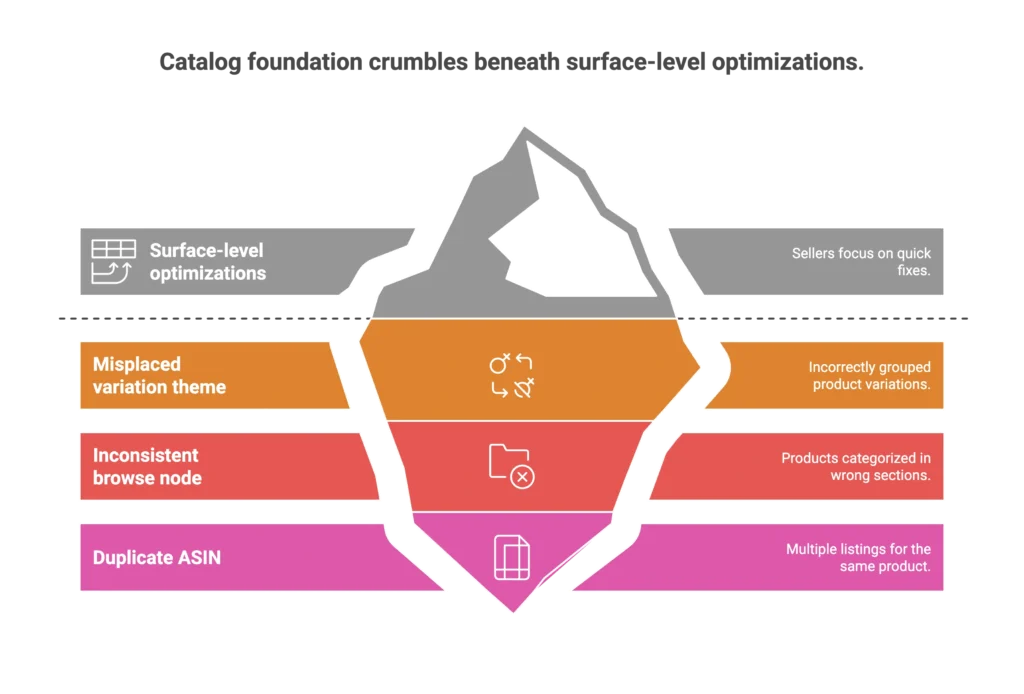
After 12 years of selling on Amazon and managing accounts that generate millions in revenue, I’ve seen the same pattern repeat: sellers focus on surface-level optimizations while their catalog foundation crumbles beneath them. One misplaced variation theme, one inconsistent browse node, one duplicate ASIN—and suddenly your product family is fighting itself for rank instead of dominating the competition. If you’re seeing these technical errors across your listings, it’s time to audit your Amazon catalog architecture to ensure every child ASIN is contributing to your organic dominance rather than draining it.
Amazon isn’t just an ecommerce platform—it’s a ranking ecosystem where catalog structure determines everything. Your parent-child setup controls which products get discovered, how reviews aggregate, and whether your advertising actually builds organic momentum or just burns cash.
The difference between a struggling listing and a dominant one isn’t better ads or prettier images. It’s catalog architecture that works with Amazon’s algorithm instead of against it. Here’s the framework that separates the winners from the stuck.
The Hidden Cost of Broken Catalog Architecture
Amazon treats each size or color of your product like its own listing. Yes, they’re parented together, but each child ASIN stands on its own for ranking purposes. If one size or color ranks for a keyword, it doesn’t mean the others will.
Here’s where it gets expensive: let’s say one variation is crushing it for your main keyword, sitting pretty on page one. That doesn’t guarantee your other sizes will rank there too. In fact, one size could be at the top of page one while another is buried at the bottom. If you sell out of that top-performing child ASIN, Amazon doesn’t just swap in another. You lose that spot, and your entire listing takes a hit.
I see this constantly in the accounts I manage. We’ll have a client whose main variation is performing beautifully, driving organic sales at strong margins. Then stock runs low on that specific child ASIN, and suddenly the whole listing’s performance craters. It’s not just lost sales—it’s lost momentum that takes weeks to rebuild.
The second killer is inconsistent browse nodes across your variations. I was just discussing this with a colleague who was dealing with reviews not merging properly across a client’s listing. When your browse nodes are inconsistent, Amazon’s algorithm gets confused about what you’re actually selling. Reviews don’t aggregate correctly, rank signals get diluted, and your variations start competing against each other instead of working together.
This creates a vicious cycle: broken catalog structure leads to poor organic rank, which forces you to spend more on ads to maintain visibility, which reduces profitability, which makes you cut corners on inventory, which creates more stock-outs and ranking drops. Most sellers never realize they’re trapped in this cycle because everything looks fine on the surface.
The Catalog Architecture Decision Tree
Not every product belongs in a variation family, and forcing the wrong structure is worse than having separate listings. Here’s the framework I use to make these decisions correctly.
Same Product, Different Attributes → Variation Family
Use variations when: Your products are functionally identical and differ only by approved variation themes like size, color, or style. The key word here is “approved”—Amazon has specific rules for each category about what constitutes a valid variation theme.
Before creating any parent-child relationship, I always check the Browse Tree Guide (BTG) for that specific category. This tells me exactly which variation themes Amazon allows and prevents the classification errors that kill organic rank.
Here’s what most sellers miss: your Item Type Keyword (ITK) controls which attributes are available and how Amazon categorizes your products. Get this wrong, and your entire catalog structure breaks down. I’ve seen sellers try to force variations that don’t belong together simply because they look similar, ignoring Amazon’s classification rules.
The process I follow: First, validate that all products truly belong in the same category. Then check the approved variation themes using the BTG. Finally, ensure the Product Type and ITK are consistent across all child ASINs. This foundation work prevents most catalog issues before they start.
Complementary Products → Virtual Bundles
When to use Virtual Bundles: You have 2-5 complementary products that work together (like a shirt and pants set) and you’re Brand Registered. Virtual Bundles let you increase average order value without corrupting your parentage structure.
The key difference: bundles are for related but distinct products, not variations of the same item. I use these strategically for clients who want to cross-sell complementary items while maintaining clean catalog architecture.
Virtual Bundles require Brand Registry and have specific rules about which products can be bundled together. They’re powerful when used correctly, but they’re not a substitute for proper variation families.
Different Product Types → Separate ASINs
Keep products separate when: They serve different functions, target different keywords, or belong in different categories. Forcing unrelated products into variation families creates review aggregation violations and confuses Amazon’s algorithm about your actual offering.
I recently worked with a client who had mistakenly parented completely different product types together. Their reviews were a mess, their keyword targeting was diluted, and their organic rank suffered across the board. Separating these into individual listings immediately improved performance.
The Classification System Most Sellers Ignore
Amazon’s classification system runs deeper than most sellers realize, and small errors here have massive downstream effects.
Product Type + ITK Mapping
Your Product Type determines which attributes Amazon makes available for your listing. Your Item Type Keyword (ITK) auto-assigns browse nodes and controls how Amazon categorizes your product for search purposes. These two elements work together to determine your listing’s discoverability.
I use specific URLs to audit these backend elements for client listings. When someone’s organic rank drops unexpectedly, inconsistent ITK or Product Type classification is often the culprit. Amazon’s bots love to “help” by filling in missing information, and they usually get it wrong.
The fix involves verifying your ITK matches your actual product category and ensuring your Product Type selection gives you access to the right attributes. Sometimes changing categories via ITK updates is necessary to restore proper classification.
Browse Node Governance
Here’s what most agencies miss: inconsistent browse nodes prevent review aggregation and dilute ranking signals. I regularly see listings where different variations have different browse nodes, causing Amazon to treat them as separate products instead of a unified family.
The Browse Tree Guide is your reference for ensuring consistent classification across all variations. When browse nodes align properly, reviews aggregate correctly, and ranking signals reinforce each other instead of competing.
The Duplicate ASIN Detection & Remediation Process
Duplicate ASINs are ranking killers that most sellers never detect until it’s too late. Amazon flags and enforces against duplicates, but their detection isn’t always immediate.
Identifying Hidden Duplicates
My monthly audit process: Download the Category Listing Report from Seller Central to spot inconsistent classifications across your catalog. Look for products that should be variations but exist as separate ASINs, or true duplicates that escaped initial detection.
Amazon provides a Potential Duplicates workflow, but you need to know where to find it and how to interpret the results. I’ve found products flagged as potential duplicates that were actually correctly separated, and missed real duplicates that were hurting performance.
The key is understanding the difference between actual duplicates (identical products that should be merged) and split variations (products that should share a parent but got separated).
The Remediation Process
For true duplicates: Use Amazon’s standard merge process through the Potential Duplicates workflow. This removes identical ASINs and consolidates their history.
For split variations: This requires a different approach. You need to request combination of split variations, which isn’t the same as merging duplicates. The process involves specific steps in Seller Central that most sellers don’t know exist.
For complex situations: Sometimes the UI limitations require flat-file solutions. I maintain CSV templates with the exact parentage structure, variation themes, and relationship types needed for stable parent-child relationships.
Advanced Catalog Levers for Scale
When managing complex catalogs with multiple variation families, the standard Seller Central interface becomes limiting.
When Flat-Files Beat the UI
The Variation Wizard works fine for simple parent-child setups, but complex catalogs need more stability. I use flat-file uploads when managing accounts with dozens of variations across multiple product families.
The advantage: Flat-files give you precise control over parent rows, child rows, parentage relationships, and variation themes. They’re also more stable—less likely to break when Amazon updates their interface or when you’re managing large-scale changes.
My team uses specific CSV schemas that include all necessary fields: parentage, variation_theme, relationship_type, Product Type, and ITK. This ensures consistent structure across entire catalogs, not just individual families.
Mobile-First Catalog Strategy
Most shoppers browse Amazon on mobile, where catalog structure becomes even more critical. Mobile users rarely scroll past the primary image and title, so your main variation needs to convert immediately.
I structure catalogs with mobile behavior in mind: the most popular variation becomes the default child ASIN, titles are optimized for mobile display, and image consistency maintains brand recognition across all variations.
This isn’t just about responsive design—it’s about understanding how mobile shoppers interact with parent-child structures and optimizing the entire catalog experience accordingly.
Frequently Asked Questions
How do I know if my parent-child setup is hurting my organic rank?
Monitor your individual child ASINs’ keyword rankings using tools like Helium 10’s Cerebro. If similar variations rank dramatically differently for the same keywords, or if your Category Listing Report shows inconsistent browse nodes, your catalog structure needs attention.
What’s the difference between merging duplicate ASINs and combining split variations?
Merging duplicates removes identical ASINs, while combining split variations reunites products that should share the same parent. Amazon has specific workflows for each—using the wrong process can make problems worse.
Should I use Virtual Bundles or variation families for product sets?
Virtual Bundles work for 2-5 complementary products (like shirt + pants) and require Brand Registry. Variations are for the same product in different sizes/colors. Mixing these approaches confuses Amazon’s algorithm and hurts discoverability.
How often should I audit my catalog structure?
Monthly audits catch most issues before they impact rank. If your organic performance suddenly drops despite stable ad spend, audit immediately—Amazon’s bots may have changed your classification without notice.
The Bottom Line: Catalog First, Everything Else Second
Most Amazon agencies treat catalog structure as a checkbox—something to set once and forget. That’s backwards thinking that keeps sellers trapped in expensive advertising cycles.
Your catalog architecture determines whether your ads build organic rank or just burn budget, whether your reviews aggregate properly, and whether Amazon’s algorithm sees you as a category leader or just another seller.
The reality check: You can’t PPC your way out of broken catalog structure. Perfect listings mean nothing if they’re competing against themselves. Organic rank starts with Amazon understanding what you’re actually selling.
Every week you delay fixing your catalog architecture, you’re leaving money on the table. Start with the decision tree framework above, audit your current setup against Amazon’s classification requirements, and treat your parent-child structure like the foundation it actually is.
The difference between a $100K listing and a million-dollar product family isn’t better advertising or prettier images—it’s catalog architecture that works with Amazon’s ecosystem instead of fighting against it. Fix your foundation first, and everything else becomes easier.

