 Skip to content
Most Amazon sellers are stuck in conversion rate hell—and they don’t even know it. You’re getting sessions, clicks are flowing, but your Unit Session Percentage is sitting at a pathetic 5% while your competitors cruise at 15%+. Sound familiar?
Here’s what’s really happening: You’re treating Amazon conversion optimization like guesswork. You’re making random image swaps and tweaking bullet points based on opinions. Meanwhile, Amazon provides the exact data you need, but you need Amazon competitor intelligence to read the signals and fix the problem.
After 12+ years of building Amazon brands and managing accounts that generate millions annually, I’ve seen this pattern hundreds of times. The sellers who break through aren’t just lucky—they understand that conversion optimization on Amazon isn’t about tactics. It’s about systems.
I currently run a brand that generates over $400,000 monthly with zero ad spend dependency, staying far away from the conversion rate hell most sellers face. That didn’t happen by accident—it happened because I understand what most sellers miss: Amazon isn’t just a pay-to-play platform, and if you don’t escape conversion rate hell, you’ll never win the ranking game where organic visibility is everything.
In this guide, I’ll walk you through the exact diagnostic framework I use to identify conversion killers, plus the step-by-step fix system that’s turned struggling listings into dominant brands. This isn’t theory—it’s the same methodology I use to manage my own accounts and my clients’ businesses.
The Real Reason Your Amazon Conversion Rate Is Tanking
The Chain Reaction Most Sellers Miss
Amazon conversion isn’t a standalone metric—it’s the result of a chain reaction. When one link breaks, everything collapses. Here’s the sequence most sellers don’t understand:
Amazon rewards listings that maintain strong conversion rates because they generate more revenue per impression. When your Unit Session Percentage drops, you enter what I call Conversion Rate Hell; Amazon’s algorithm interprets this as a poor customer experience and reduces your visibility—trapping you in Conversion Rate Hell even for keywords you previously ranked well for organically.
Think about it like a retail store. If you’re a store manager and one product consistently gets picked up but never purchased, what do you do? You move it to the back of the store. Amazon does the same thing—algorithmically.
The Four Hidden Conversion Killers
Killer #1: Mobile-First Failure
Most people never even scroll past the title on mobile, yet most sellers still optimize for desktop. Your main image needs to tell the complete story in a 2-inch square because that’s where the buying decision happens.
I’ve seen listings with beautiful desktop layouts that completely fall apart on mobile. The product looks tiny, the text is unreadable, and the value proposition disappears. Since over 70% of Amazon traffic comes from mobile, this is conversion suicide.
Killer #2: Inventory Distribution Issues
You think you have enough stock, but Amazon’s fulfillment centers aren’t distributing it properly. Customers in Kansas see two-day shipping while customers in Florida see six days. That delivery time difference kills conversions faster than bad reviews.
I built a custom tool that maps inventory distribution by zip code specifically to help sellers escape Conversion Rate Hell. When you’re low on stock, Amazon consolidates inventory to fewer fulfillment centers; suddenly, half your customers see extended shipping times and bounce—plunging your listing into Conversion Rate Hell even though you technically still have inventory.
Killer #3: Child ASIN Chaos
For multi-variation listings, Amazon ranks individual child ASINs for specific keywords. When your best-selling variation goes out of stock, your whole listing can crash because the remaining variations rank on page two for your main keywords.
I’ve watched clothing brands enter Conversion Rate Hell and lose thousands in sales because their black medium (the MVP variation) sold out, causing their listing to vanish from search. The listing didn’t break—the algorithm just switched to a less-relevant child ASIN that couldn’t compete, trapping the entire brand in Conversion Rate Hell.
Killer #4: Backend Optimization Blindness
You’re leaving money on the table in places customers never see. Empty alt text in A+ content, unused backend description space, and missing catalog attributes that Amazon uses for ranking but sellers ignore.
Most sellers have no idea they can put 100 characters of keywords in each A+ content alt text field. That’s hidden indexing real estate. I use a Chrome extension to audit competitors’ backend optimization, and most leave these fields completely blank.
Why Conventional Wisdom Fails
The “experts” tell you to improve images or rewrite bullets, but they don’t give you a system. They don’t teach you how to read Amazon’s own diagnostic tools to pinpoint exactly where the conversion is breaking down.
They’re treating symptoms, not diagnosing the disease.
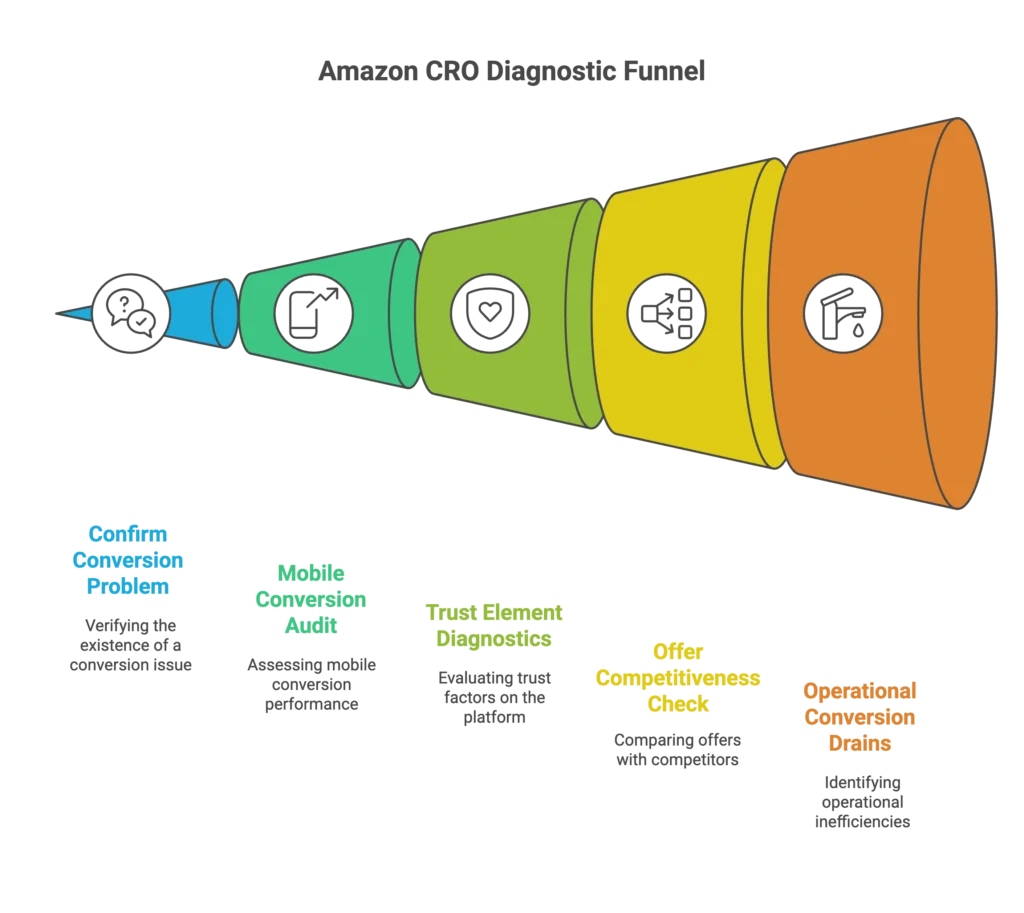
The 5-Step Amazon CRO Diagnostic System
Step 1: Confirm You Actually Have a Conversion Problem
Use Business Reports (Unit Session Percentage): Don’t guess. Go to Business Reports > Detail Page Sales and Traffic and check your Unit Session Percentage over the last 30 days. If you’re below 10% in most categories, you have a conversion problem. Amazon even shows you the category average for comparison.
Cross-Reference with Search Query Performance: Your Search Query Performance report tells the real story. Look at the click-through rate versus add-to-cart rate for your top keywords. If people are clicking but not buying, you have a product page trust issue. If they’re not even clicking, your main image or price positioning is wrong.
This data separation is crucial. Most sellers look at overall metrics and miss the specific breakdown that reveals whether the problem is traffic quality or page conversion.
Step 2: The Mobile Conversion Audit
The 5-Second Test: Open your listing on mobile and give yourself 5 seconds to understand what the product is, why someone would want it, and if the price makes sense. If you can’t get that clarity, neither can your customers.
Most sellers optimize on desktop and never check mobile. This is backwards. Your mobile listing needs to work as a complete sales story in the first screen because most mobile users won’t scroll.
Image Stack Priority Check: Your first three images need to work in sequence: main image (what it is), lifestyle image (why they want it), feature callout (why yours is better). Most sellers randomize this order and wonder why conversions suffer.
To rescue your listing from Conversion Rate Hell, your main image should make someone want to click. Your second image should make them want to buy, and your third image should make them trust you over competitors to ensure you never fall back into Conversion Rate Hell.
Step 3: Trust Element Diagnostics
Review Profile Analysis: Check your recent reviews for recurring themes. If customers mention confusion about size, fit, or functionality, your product page isn’t setting proper expectations. These objections need to be handled in your bullets or A+ content before they become conversion killers.
I audit every client’s reviews monthly because they reveal exactly what’s stopping purchases. When three reviews mention “smaller than expected,” that’s not bad luck—that’s a conversion leak you can fix with better size context in your images.
Q&A Red Flags: Your Questions & Answers section reveals exactly what’s stopping purchases. If the same questions appear repeatedly, you have information gaps that hurt conversion. Answer these proactively in your listing content.
Step 4: Offer Competitiveness Check
Featured Offer Status: You can have the perfect product page, but if you’re not the Featured Offer (Buy Box), your conversion rate will tank. Check your Buy Box percentage in Business Reports—anything below 90% needs immediate attention.
Most sellers don’t realize that temporary Buy Box losses create conversion volatility that damages long-term organic rank. Amazon tracks consistency, not just peak performance.
Price Positioning Reality: Use tools like Keepa to see your competitors’ pricing history. If you’re priced 20%+ above similar products without clear differentiation, you’re fighting an uphill conversion battle.
But here’s what most miss: it’s not just about being the cheapest. It’s about being competitively positioned within your value tier. Premium products can convert well at premium prices if the page justifies the premium.
Step 5: Operational Conversion Drains
Inventory Distribution Mapping: Amazon spreads your inventory across fulfillment centers based on demand patterns. When you’re low on stock, they consolidate inventory, creating shipping delays that kill conversions in affected regions.
I maintain 60-90 days of inventory at all times because anything less triggers distribution consolidation. When you drop below 30 days, Amazon pulls your inventory to centralized locations, and suddenly customers in major metro areas see 4-6 day shipping instead of 2 days.
Buy Box Stability Tracking: Monitor your Buy Box percentage daily. Even temporary losses due to pricing or inventory issues create conversion volatility that damages long-term organic ranking.
The Systematic Fix Framework

Fix #1: Mobile-First Listing Reconstruction
Main Image Optimization Protocol:
Start with A/B testing your main image using Amazon’s Manage Your Experiments tool. Most sellers never touch this native testing platform, but it’s the only way to get statistically significant results on image performance.
To escape Conversion Rate Hell, test variations that clearly show the product, its size context, and key benefits. I often test images with different compositions—sometimes making my product appear larger in the frame than competitors’—to provide the visual impact needed to pull your listing out of Conversion Rate Hell and back into the top of the search results.
Information Hierarchy for Mobile:
Your title, bullet points, and first A+ content module need to work as a complete story for mobile users. Structure your bullets to answer the three questions every buyer has: What is it? Why do I need it? Why should I trust you?
Most sellers write bullets like feature lists. Winners write bullets like sales copy that anticipates and handles objections.
Fix #2: Trust-Building Content Strategy
Review-Driven Content Updates:
Use your recent reviews as a content roadmap. For every objection mentioned in 2+ reviews, create a bullet point or A+ content section that proactively addresses it. This isn’t just about managing perception—it’s about preventing returns that hurt your conversion rate long-term.
Amazon Vine Strategic Enrollment:
Here’s a tactic most get wrong: when you enroll in Amazon Vine, set your price aggressively low during enrollment. Vine reviewers base their reviews on perceived value, so a $50 product listed at $29 gets five stars, while the same product at $69 gets four stars for being “overpriced”—even though it’s free for them.
I’ve seen sellers waste thousands by enrolling in Vine at full price and getting mediocre reviews during their crucial launch period. The smart play is to temporarily lower your price, capture all five-star Vine reviews, then raise your price once you have social proof.
Fix #3: Inventory & Fulfillment Optimization
The 90-Day Stock Rule:
Maintain 60-90 days of inventory at all times. When you drop below 30 days, Amazon consolidates your inventory to fewer fulfillment centers, creating shipping delays that hurt conversion rates in affected regions.
I’ve tracked this pattern across dozens of accounts. The conversion rate drop happens before you actually run out of stock—it happens when Amazon starts worrying you might run out.
Regional Shipping Impact Monitoring:
Monitor your shipping promises across different zip codes. When customers see anything longer than 3-day shipping in major metro areas, your conversion rate drops measurably. This is especially critical during Q4 when shipping expectations are highest.
Fix #4: Backend Optimization That Actually Matters
Maximize Hidden Keyword Real Estate:
Fill your backend search terms (250 characters), A+ content alt text fields (100 characters each), and backend description (2,000 characters). These aren’t customer-facing, but they help Amazon understand your product for better keyword matching.
Most sellers leave this blank or just repeat their main keywords. I include misspellings, Spanish terms, and long-tail variations that auto campaigns surface over time.
Listing Quality Dashboard Hygiene:
Use Amazon’s Listing Quality Dashboard weekly to identify missing product attributes. The “View all improvements” feature lets you bulk-add missing information that affects both conversion and discoverability.
This is free optimization most sellers ignore. Missing attributes like material, size, or intended use can disqualify you from relevant searches entirely.
Advanced Conversion Tactics for Plateau Breakers
The Penny Price Change Hack
One of my most effective tactics is the penny price adjustment strategy. Change your price by just one cent (up or down) to trigger notifications for everyone who has your product saved in their cart or wishlist.
This reminder mechanism drives immediate conversions from warm prospects who forgot about your product. It’s not the penny price change that motivates them—it’s the reminder that they had already shown purchase intent.
Catalog Architecture for Conversion
Strategic Variation Management:
For multi-variation listings, your conversion rate depends on which child ASIN Amazon shows for each keyword. When your best-converting variation goes out of stock, your whole listing can crash because the remaining variations might rank poorly for your main terms.
I structure variations with keyword-rich names that help Amazon understand which child should rank for which search terms. “Men’s Large Black Athletic Shorts” ranks better for relevant terms than “Size L Color Black.”
The Honeymoon Period Reset
Even aged listings can recapture momentum through strategic relaunches. When you make significant optimization changes—new images, updated copy, fresh A+ content—Amazon treats this as renewed listing activity.
I recently took a year-old listing and successfully relaunched it to top positions for main keywords by treating the reoptimization like a new launch. The key is making substantial changes all at once, not gradual tweaks over time.
The Weekly Amazon CRO Review System
Monday: Performance Diagnostics
Review your Unit Session Percentage by device type and traffic source. Identify your worst-performing keywords and check if the issue is traffic quality (wrong search intent) or conversion weakness (page not convincing qualified traffic).
Wednesday: Testing Pipeline Management
Check active Manage Your Experiments tests for significance levels. Plan your next test based on the biggest conversion opportunity identified in Monday’s review. Never run multiple tests simultaneously on the same listing—you’ll never know which change drove results.
Friday: Operational Health Check
Verify Featured Offer status, check inventory distribution across fulfillment centers, and review any customer service issues that might indicate conversion problems (confusion about variants, shipping expectations, etc.).
This weekly rhythm keeps you ahead of conversion issues before they impact your organic rankings.
FAQ: Amazon Conversion Rate Optimization
How do I know if my conversion rate problem is actually fixable?
Check your Search Query Performance report. If you’re getting impressions and clicks for relevant keywords but low add-to-cart rates, your page has conversion issues you can fix. If you’re not getting clicks at all, your main image or price positioning needs work first.
What’s the difference between Unit Session Percentage and conversion rate in Amazon ads?
Unit Session Percentage (in Business Reports) measures overall listing conversion from all traffic sources. PPC conversion rate (in advertising reports) only shows paid traffic performance. Both matter, but USP is your primary conversion health metric.
Should I test images or copy first for conversion optimization?
Always test your main image first. It has the biggest impact on both click-through rate and initial purchase intent. Once your main image is optimized, move to title testing, then bullet points, then A+ content.
How long should I run conversion optimization tests?
Use Amazon’s Manage Your Experiments tool and run tests to statistical significance, not arbitrary time periods. Typically 2-4 weeks depending on your traffic volume. Don’t stop tests early based on initial trends—let the data reach confidence levels.
Can inventory management really impact conversion rates?
Absolutely. When you’re low on stock, Amazon consolidates inventory to fewer fulfillment centers. This creates longer shipping times for some customers, who then bounce without buying. I maintain 60-90 days of inventory specifically to avoid this conversion killer.
From Conversion Hell to Conversion Excellence
Amazon conversion optimization isn’t about random tactics—it’s about systematic diagnosis and strategic fixes. The sellers who break through understand that Amazon rewards consistency, and conversion rate is the foundation everything else builds on.
The framework I’ve outlined isn’t theory—it’s the escape route for sellers trapped in conversion rate hell. It’s the same system I use to manage accounts generating millions annually and the exact approach that saved my own brand from conversion rate hell to reach over $400,000 monthly with zero ad dependency.
The Bottom Line: Your conversion rate problems have specific, identifiable causes. Use Amazon’s own diagnostic tools to find them, implement fixes systematically, and measure results with real data—not opinions.
Amazon isn’t a guessing game. It’s a data game. And once you learn to read the signals, conversion optimization becomes predictable, systematic, and profitable.
The sellers stuck in conversion hell are the ones treating Amazon like a mystery. The sellers who dominate treat it like the ranking system it actually is—where conversion rate determines everything.
Ready to escape conversion rate hell? Start with the diagnostic system this week. Your organic rankings—and your profit margins—will thank you.


